
Download GCFlix – Netflix Global Catalog, Video Information, Country Availability
Overview
GCFlix is a specialized Android application designed for users who frequently access Netflix content across different regional catalogs. Developed by KB-AndroidTools, the app serves as a comprehensive reference tool that provides detailed information about the availability of Netflix titles in various countries. It is particularly useful for users who rely on virtual private networks (VPNs) to switch between Netflix regions and want to identify which content is accessible in each location.
The primary purpose of GCFlix is to offer real-time data on video availability, including the list of countries where a specific title is available, its type (film, series, documentary, etc.), and key metadata such as release date, synopsis, and ratings from both Netflix and IMDb. This functionality helps users make informed decisions about which content to watch and where to route their connection for optimal access.
Targeted at tech-savvy Netflix enthusiasts, content researchers, and regional streaming explorers, GCFlix supports a niche but growing segment of users who value cross-border access to entertainment. It is not a streaming tool and does not host or deliver video content. Instead, it acts as a curated information hub, aggregating publicly available data from external sources. The app is free to use with no in-app purchases or advertisements, and it does not collect user data, emphasizing privacy and lightweight performance.
Key Features & Capabilities
- Global Catalog Access – Displays the list of countries where each Netflix title is available, helping users identify optimal regions for viewing.
- Daily Database Updates – Ensures users receive the most current information on title availability and metadata.
- Comprehensive Video Metadata – Provides details such as video type, release date, synopsis, Netflix and IMDb ratings, and content classification.
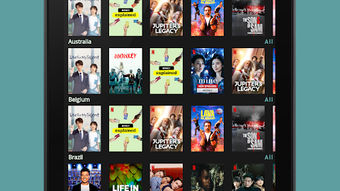
- Country-Based Exploration – Allows users to browse all available videos within a specific country’s catalog.
- Smart Sorting Options – Content can be sorted by release date and average rating to discover recent or highly-rated titles.
- Efficient Search Functionality – Enables quick lookup of specific titles and immediate access to relevant availability and detail information.
- Independent Information Source – GCFlix does not own or stream content; it collects and organizes publicly available data.
These features are especially valuable for users managing multiple VPN connections or planning content access strategies. For example, a user planning to watch a film only available in the UK catalog can use GCFlix to confirm its availability and check its IMDb rating before switching regions. The app also supports content discovery by allowing users to explore trending or newly released titles across different countries.
User Interface, Workflow & Performance
GCFlix features a clean, minimalistic interface optimized for Android devices, with intuitive navigation that prioritizes quick access to core functions. The layout is structured around a main search bar, categorized tabs, and a responsive list view that displays video entries with essential metadata. Users can tap any entry to view detailed information, including availability across countries and ratings.
The workflow is straightforward: users either search for a specific title or browse by country. Sorting options are accessible via a simple menu, and the app responds promptly to user input. The interface is designed to be accessible on a range of screen sizes, from smartphones to tablets, with consistent layout behavior.
Performance details were not specified by the developer. However, the app is described as lightweight and resource-efficient, with no significant impact on device performance. The developer did not provide additional system requirements. General software behavior suggests stable operation under normal conditions, with minimal background activity. The app requires an active internet connection to load and update data, and it does not cache content locally.
Compatibility & System Requirements
GCFlix is compatible with Android 5.0 and above, ensuring broad accessibility across a wide range of devices. The app has a file size of 4.2 MB, indicating a compact footprint that does not strain storage or bandwidth. This makes it suitable for older devices with limited resources.
The developer did not specify exact CPU or RAM requirements. However, the lightweight nature of the app and its minimal resource usage suggest it runs efficiently on devices with modest hardware. Installation is straightforward via Google Play, and no additional dependencies are required. The app is available in English and does not include language-specific features beyond the default interface.
Pros and Cons
Pros
- Free to download and use with no ads or in-app purchases
- Lightweight design with minimal system resource consumption
- Daily database updates ensure up-to-date information
- Comprehensive metadata including ratings from Netflix and IMDb
- Efficient search and sorting tools for content discovery
- Privacy-focused: no user data collection or tracking
- Independent app not affiliated with Netflix
Cons
- Requires constant internet connection to access data
- Does not stream or play videos – only provides information
- Available only on Android, not on iOS or desktop platforms
- No offline mode for content access
- Content accuracy depends on external data sources, not controlled by the app
FAQ Section
Is GCFlix officially affiliated with Netflix?
GCFlix is an independent application and is not affiliated with, endorsed by, or owned by Netflix or its parent companies. The Netflix brand is a registered trademark of Netflix, Inc.
Does GCFlix require an internet connection?
Yes, an active internet connection is required to access and update the video database and related information within the app.
Can I use GCFlix to watch Netflix content?
No, GCFlix does not stream or play video content. It only provides information about the availability and metadata of Netflix titles across different regions.
Is GCFlix safe to use?
Yes, the developer, KB-AndroidTools, has confirmed that the app does not collect user data, does not contain malware, and is designed with privacy in mind.
How often is the database updated?
The video database is updated daily to reflect the latest changes in Netflix’s regional catalogs.
Final Thoughts
GCFlix stands out as a reliable, privacy-conscious tool for Netflix users navigating the complexities of regional content availability. Its clean interface, daily updates, and comprehensive data make it a valuable asset for anyone seeking to maximize their streaming experience across borders. While it does not offer video playback, its role as a reference app is executed efficiently and without unnecessary frills.
For users who rely on VPNs to access international Netflix catalogs, GCFlix eliminates guesswork by providing accurate, real-time information on where specific titles are available. Its lightweight design and lack of ads or data collection enhance the overall user experience. Though limited to Android and requiring internet access, its focused functionality delivers high value for its niche audience.
Download GCFlix now






.png)
